
Podman and Rootless Containers in 2026: The Docker Alternative Sysadmins Are Switching To
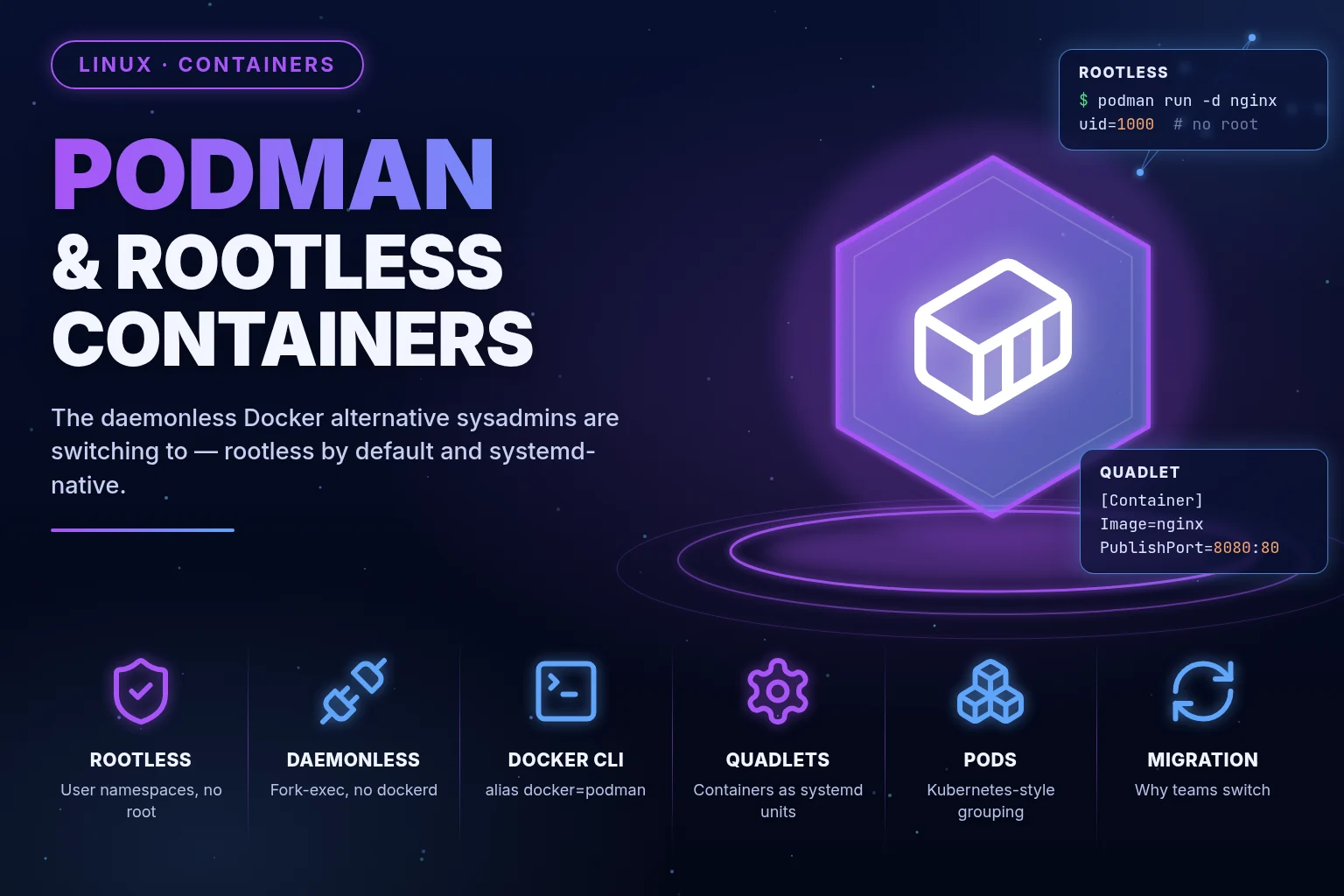
Why sysadmins are migrating to Podman in 2026 — rootless containers, a daemonless architecture, Docker CLI compatibility, and systemd quadlets for production.
On this page
I spent an afternoon last month explaining to a junior sysadmin why the docker group on our build server was effectively equivalent to passwordless root. He didn’t believe me until I showed him the one-liner: add a user to docker, mount / into a container, chroot in, done — full host access, no sudo required, no audit trail pointing at anything except “ran a container.” That conversation is what finally pushed our team off Docker and onto Podman across every server we don’t strictly need Docker Desktop’s GUI for. If you’re still running a root daemon to manage containers in 2026, it’s worth understanding exactly what you’re trading away, and what Podman gives you instead.
What Podman Actually Is
Podman (short for “Pod Manager”) is a container engine built by Red Hat, designed to be a drop-in replacement for the docker command with two structural differences that matter a lot in production: it has no background daemon, and it can run containers entirely without root privileges. It implements the OCI (Open Container Initiative) standards for images and runtimes — the same standards Docker itself implements — so images built by either tool run fine on either tool. This isn’t a from-scratch reinvention of containers; it’s a different architectural answer to “how should a container engine be built” that happens to have matured into the default choice on Red Hat-family distros (RHEL, Fedora, CentOS Stream) and an increasingly common choice everywhere else.
Daemonless Architecture: Why No Docker Daemon Changes Everything
Docker’s architecture centers on dockerd, a long-running background daemon with root privileges that owns every container, image, network, and volume on the box. Your docker CLI commands are really just API calls to that daemon over a Unix socket. This design has real consequences:
- Single point of failure. If
dockerdcrashes or gets restarted (say, during a package upgrade), every container it manages can be affected, even ones that were running fine. - A juicy attack surface. That socket,
/var/run/docker.sock, is root-equivalent. Anyone who can write to it can run arbitrary code as root on the host. This is the exact mechanism I demonstrated to that junior admin. - Process tree confusion. Containers are children of the daemon, not of the shell or process that launched them, which complicates process supervision and signal handling in some setups.
Podman throws the daemon out entirely. Each podman run forks and execs a container as a direct child process of the command that invoked it, using conmon (a lightweight per-container monitor process) to keep it running and track its exit status. There’s no long-lived privileged process sitting on the box waiting to be exploited. When you run podman ps, Podman queries container state directly from the container runtime and filesystem — there’s no API call to a separate service, because there is no separate service.
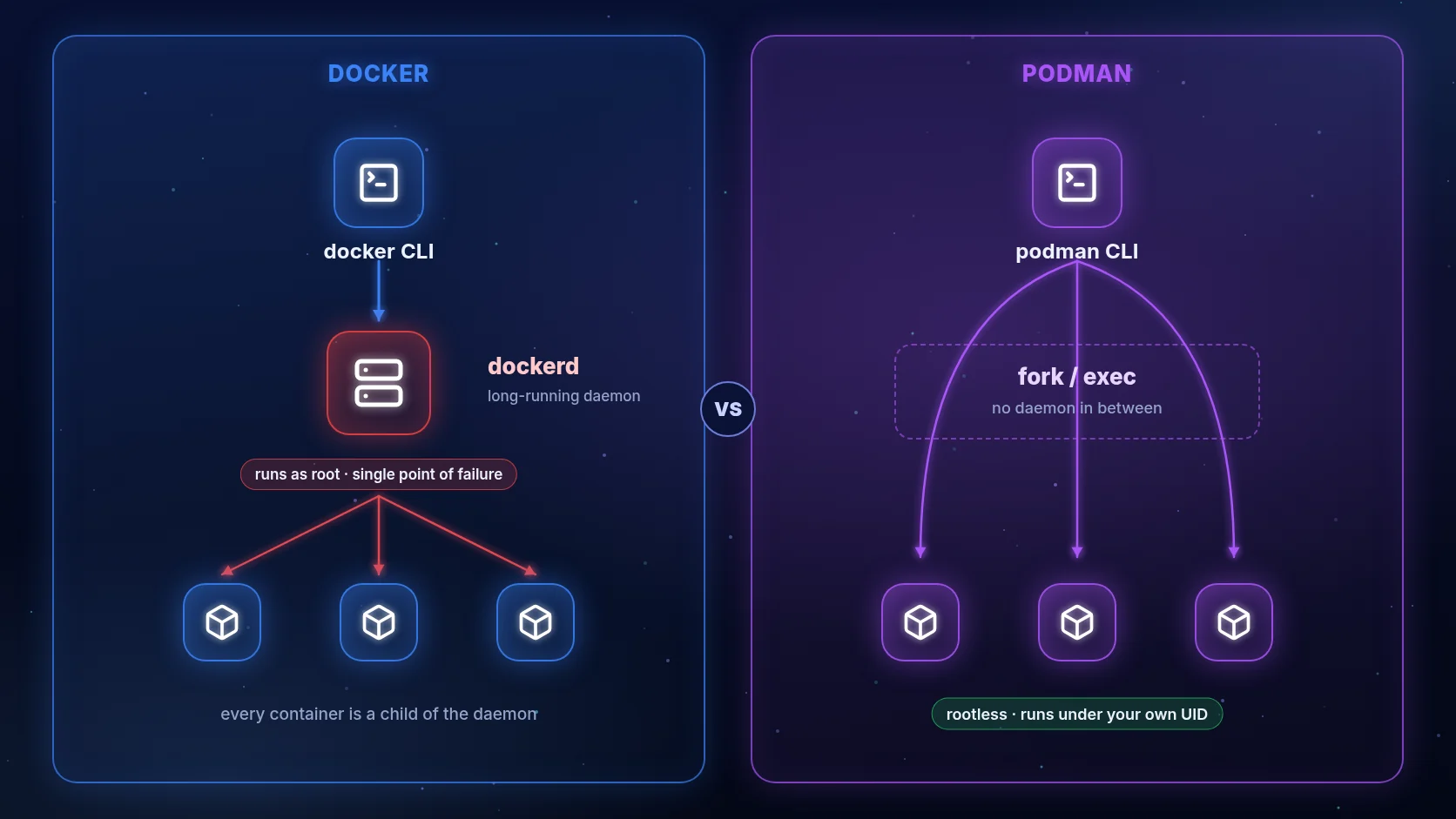
This also means systemctl restart on your container tooling isn’t a thing that can happen — because there’s no service to restart. Podman genuinely just isn’t running when you’re not actively invoking it.
Rootless Containers Explained: How Podman Runs Without Root
This is Podman’s headline feature, and it’s worth understanding the actual mechanism rather than just trusting the marketing.
Rootless containers rely on a Linux kernel feature called user namespaces. A user namespace lets a process believe it’s running as root (UID 0) inside the namespace, while the kernel maps that UID to an unprivileged, non-root UID on the actual host. So a process inside your rootless container can chown files, bind to arbitrary “root-owned” paths, and generally act like root — but only within the sandbox of that namespace. If that process somehow breaks out of the container, it lands as your regular unprivileged host user, not as root. The blast radius of a container escape shrinks from “the whole machine” to “whatever your normal user account can already touch.”
The practical setup uses two host-level mechanisms working together:
/etc/subuidand/etc/subgidallocate a range of UIDs/GIDs on the host that your user is permitted to “loan out” to processes inside user namespaces. A typical entry looks like:
# /etc/subuid
anoop:100000:65536
This grants the anoop user a block of 65,536 UIDs starting at 100000, which Podman uses to remap container UIDs.
newuidmap/newgidmap(setuid helper binaries, or increasingly handled via unprivileged user namespace features on newer kernels) perform the actual UID mapping when a rootless container starts.
Run podman unshare cat /proc/self/uid_map inside a rootless session and you can see the mapping directly — your container’s “root” is mapped to a completely different, unprivileged range on the real host.
podman run --rm -it alpine id
# uid=0(root) gid=0(root) groups=0(root)
podman unshare cat /proc/self/uid_map
#          0     100000      65536   -> container-UID-0 maps to host UID 100000
Rootless mode does have real limitations worth knowing before you migrate a whole fleet: binding to privileged ports (below 1024) requires either sudo sysctl net.ipv4.ip_unprivileged_port_start=80 or Podman’s built-in port-forwarding workaround; certain networking modes (macvlan in particular) and some storage drivers behave differently or aren’t available; and a handful of legacy images that hard-code assumptions about running as UID 0 with real root privileges need adjustment. None of these are dealbreakers for the vast majority of workloads, but they’re the honest list, not a marketing footnote.
Docker CLI Compatibility: Migrating Without Rewriting Everything
The reason Podman migrations tend to be low-drama is that the CLI is intentionally, almost aggressively compatible with Docker’s. Most teams migrate muscle memory in an afternoon:
podman build -t myapp:latest .
podman run -d -p 8080:80 myapp:latest
podman ps
podman logs -f myapp
podman exec -it myapp sh
podman-compose up -d   # or native `podman compose` on recent versions
Same flags, same subcommands, same Dockerfile syntax (Podman reads standard Dockerfiles natively via buildah under the hood). If your CI scripts, Makefiles, or muscle-memory shell aliases are full of docker invocations, the fastest migration path is genuinely:
alias docker=podman
That single alias gets a surprising fraction of workflows working immediately. For more permanent setups, Podman ships a podman-docker package on most distros that symlinks /usr/bin/docker to podman outright, so tools that shell out to a literal docker binary keep working unmodified.
The one place compatibility genuinely diverges is docker-compose — Podman’s Compose story has matured a lot but historically lagged, so check your Compose file’s use of Docker-specific extensions (some depends_on health-check timing behavior, certain network driver options) before assuming a one-to-one swap on complex multi-service stacks.
Systemd Quadlets: Running Podman Containers as Managed Services
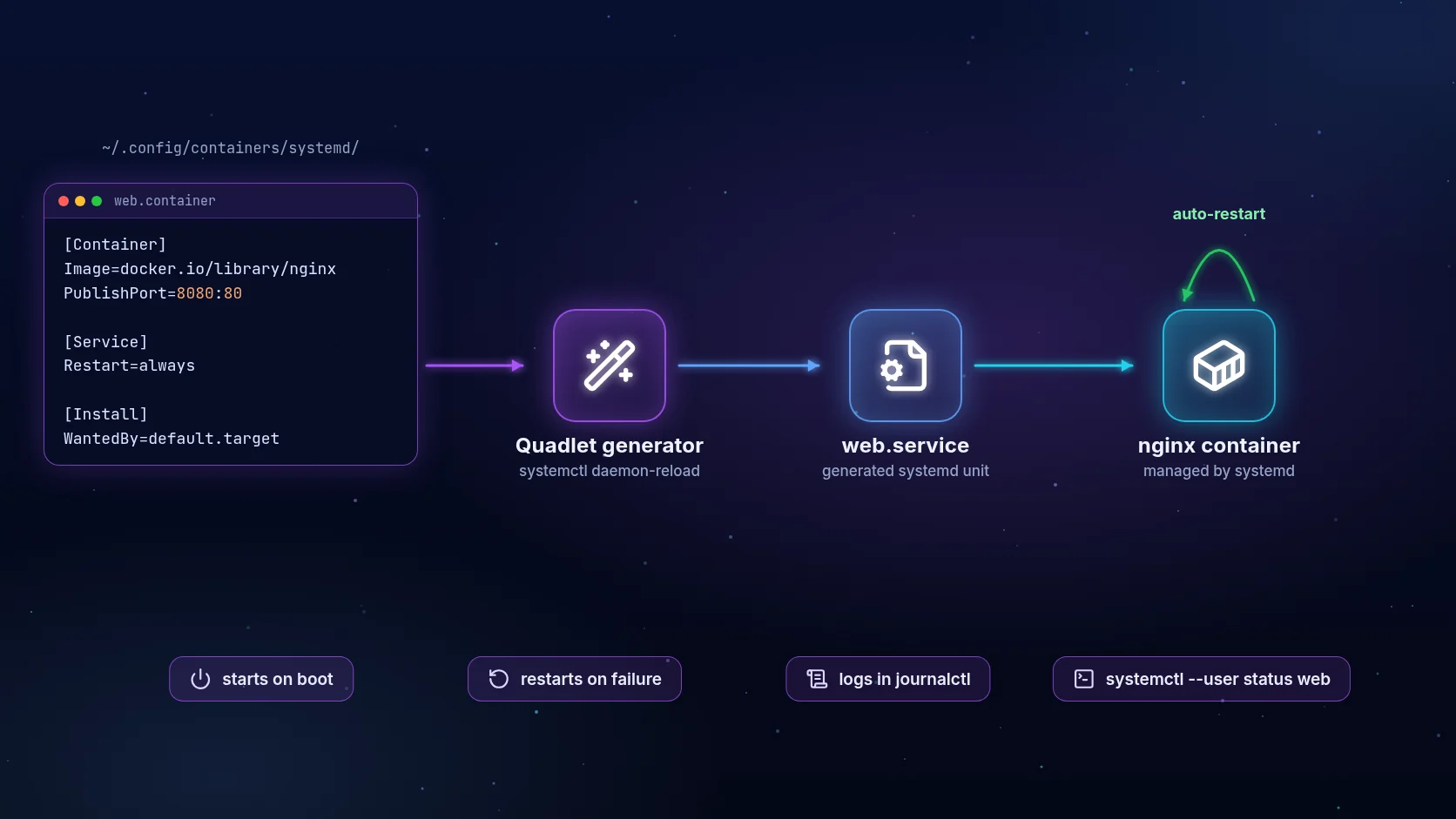
This is where Podman stops being “Docker but rootless” and starts being genuinely better-integrated for production Linux hosts. Older Podman versions used podman generate systemd to spit out a unit file from a running container — functional, but fragile, since the generated file could drift from the container’s real definition.
Quadlets, stable since Podman 4.4+ and the standard approach in 2026, replace that with a declarative unit file format that systemd itself understands natively via a generator. You write a .container file, drop it in the right directory, and systemd handles the rest — start, stop, restart-on-failure, dependency ordering, journald logging, all the systemd machinery you already trust for every other service on the box.
A minimal quadlet for a web app, saved as /etc/containers/systemd/myapp.container:
[Unit]
Description=My App Container
After=network-online.target

[Container]
Image=docker.io/library/myapp:latest
PublishPort=8080:80
Volume=myapp-data:/data
Environment=NODE_ENV=production

[Service]
Restart=always

[Install]
WantedBy=multi-user.target
Reload systemd and the container becomes a real, first-class unit:
systemctl daemon-reload
systemctl start myapp.service
systemctl enable myapp.service
journalctl -u myapp.service -f
No sidecar orchestrator, no separate init system for containers, no split-brain between “what systemd thinks is running” and “what the container runtime thinks is running.” For a single host or a small fleet that doesn’t justify the operational overhead of a full Kubernetes cluster, this is the sweet spot — production-grade service management using tooling that’s already on every Linux box, applied directly to containers.
Pods: Kubernetes-Style Grouping, No Cluster Required
Podman’s name isn’t an accident — it natively understands the Kubernetes pod concept, a group of containers sharing a network namespace and localhost connectivity, without needing an actual Kubernetes cluster:
podman pod create --name mystack -p 8080:80
podman run -d --pod mystack --name web myapp:latest
podman run -d --pod mystack --name cache redis:alpine
web and cache share a network namespace, so web reaches cache over localhost:6379, exactly like sidecar containers in a Kubernetes pod. You can even export a running pod straight to Kubernetes YAML with podman generate kube, which is a genuinely useful bridge when a local multi-container dev setup needs to graduate into a real cluster manifest without hand-writing it from scratch.
Why Teams Are Migrating in 2026
A few forces converged to make this the year Podman migration talk moved from “interesting” to “on the roadmap” for a lot of ops teams:
- CVE fatigue around root daemons. Every year brings another container-escape or daemon-socket CVE that’s a non-issue on rootless-by-default setups. Security review cycles increasingly flag Docker’s default daemon posture directly.
- RHEL/Fedora made it the default. Docker isn’t in the default RHEL/Fedora/CentOS Stream repos anymore; Podman is. Anyone running Red Hat-family servers has been nudged toward Podman for years, and 2026 is when a lot of that installed base has finally consolidated its tooling around it instead of maintaining Docker as a bolt-on.
- Docker Desktop’s licensing changes pushed teams at mid-size and larger companies to re-evaluate their whole container tooling stack, and Podman Desktop (a genuinely solid GUI, also daemonless under the hood) came up as a licensing-friction-free alternative.
- Kubernetes alignment. Podman’s pod-native model and OCI compliance mean what you test locally maps more directly onto what actually runs in a cluster, versus translating Docker Compose mental models onto Kubernetes manifests.
None of this means Docker is going away — its ecosystem, Docker Hub integration, and Compose tooling are still enormous and well-supported. But for sysadmins specifically, who care about attack surface, systemd integration, and not running unnecessary privileged daemons, Podman in 2026 has crossed from “alternative worth watching” to “the obvious default for new Linux server builds.”
FAQ
Is Podman a full Docker replacement? For the vast majority of build/run/manage workflows, yes — the CLI is compatible enough that most scripts work with an alias swap. Compose-heavy multi-service stacks and Docker Desktop-specific GUI workflows need more careful checking.
Do rootless containers have worse performance than root containers? No meaningful difference for typical workloads. The user-namespace UID remapping happens at container start, not per-syscall, so runtime performance is essentially identical to root-mode containers.
Can Podman run Docker images? Yes. Both use the OCI image format, so images from Docker Hub, GHCR, or any OCI-compliant registry run under Podman without modification.
What about docker-compose files — do they just work? Mostly, via podman-compose or native podman compose support in recent releases. Double-check Docker-specific Compose extensions on complex stacks before trusting a blind migration.
Does rootless Podman support networking on privileged ports below 1024? Not by default — you either adjust net.ipv4.ip_unprivileged_port_start, use Podman’s port-forwarding rootless helper, or publish on a high port and front it with a reverse proxy.
Is Podman only for Red Hat-based distros? No — it’s packaged for Ubuntu, Debian, Arch, and most major distros, and runs on macOS/Windows via a Podman machine VM, similar in spirit to Docker Desktop’s approach but without the licensing baggage.
Closing Thought
The daemon-vs-daemonless, root-vs-rootless debate isn’t an abstract architecture preference — it’s the difference between “a container escape gets an attacker unprivileged shell access” and “a container escape gets an attacker root on the box.” That’s the whole pitch, and it’s why sysadmins who’ve spent a career being paranoid about privilege boundaries keep landing on Podman once they actually sit down and read the uid_map output for themselves. You don’t have to rip out Docker everywhere overnight. Start with one new server build, alias docker to podman, wire up a quadlet for whatever you’d normally hand-roll a systemd unit for, and see how much of your existing muscle memory just keeps working. For most of us, it’s almost all of it.