
Kotlin Coroutines and Structured Concurrency in 2026: A Deep Dive for Android Developers
A practical 2026 guide to Kotlin coroutines and structured concurrency — suspend functions, Flow, dispatchers, and the pitfalls that still trip up Android developers.
On this page
I once spent an entire afternoon chasing a bug where a network call kept firing after the user had already backed out of the screen — the response would come back, try to update a ViewModel that no longer had an active observer, and quietly leak. The fix wasn’t a null check or a lifecycle callback. It was realizing I’d launched the coroutine in GlobalScope instead of viewModelScope, which meant nothing was ever going to cancel it. That single line was the difference between a leak and a self-cleaning coroutine tree. Coroutines make async code read like sequential code, and that readability is exactly what lets bugs like this hide in plain sight. Six years after coroutines went stable, I still see this class of mistake in production codebases, so I want to walk through how coroutines and structured concurrency actually work in 2026 — not the marketing pitch, the mechanics.
What suspend functions explained actually means under the hood
The suspend keyword is the single most misunderstood piece of Kotlin syntax. It doesn’t create a thread. It doesn’t make a function “async” in the JavaScript Promise sense. What it does is mark a function as one that can pause and resume without blocking the thread it’s running on. The Kotlin compiler rewrites every suspend function using continuation-passing style (CPS) — under the hood, suspend fun fetchUser(id: String): User becomes something closer to fun fetchUser(id: String, continuation: Continuation<User>): Any?, where the compiler generates a state machine that tracks which suspension point the function is currently sitting at.
suspend fun fetchUserProfile(userId: String): UserProfile {
    val user = api.getUser(userId)       // suspension point 1
    val posts = api.getPosts(userId)     // suspension point 2
    return UserProfile(user, posts)
}
Each suspend call inside this function is a potential pause point. When api.getUser suspends, the thread is freed to do other work — it doesn’t sit there blocked. When the result is ready, the coroutine resumes, possibly on a different thread from a thread pool, picking up exactly where it left off. This is the core trick: coroutines get you the non-blocking behavior of callbacks without the callback pyramid, because the compiler is generating the callback plumbing for you.
The practical implication: a suspend function can only be called from another suspend function, a coroutine builder (launch, async, runBlocking), or a coroutine scope. That “coloring” of functions is intentional — it forces you to be explicit about where async boundaries exist, which is exactly what makes structured concurrency possible in the first place.
Structured concurrency: the actual guarantee, not just the buzzword
“Structured concurrency” gets thrown around as a vague good-practice term, but it has a precise meaning: every coroutine you launch must belong to a CoroutineScope, and a scope cannot complete until all the coroutines launched inside it complete. Parent-child relationships form a tree. Cancel the parent, and cancellation propagates down to every child automatically. Let a child throw an unhandled exception, and by default that exception propagates up and cancels the parent (and its siblings) too.
class ProfileViewModel : ViewModel() {
    fun loadProfile(userId: String) {
        viewModelScope.launch {
            val user = async { api.getUser(userId) }
            val posts = async { api.getPosts(userId) }
            _state.value = ProfileState(user.await(), posts.await())
        }
    }
}
Here, user and posts run concurrently, but they’re both children of the same viewModelScope coroutine. If the ViewModel is cleared while both calls are in flight, viewModelScope cancels — and both the user and posts coroutines are cancelled with it. No manual bookkeeping, no CompositeDisposable, no dangling network callback trying to write to a dead object. This is the entire point of structured concurrency: a coroutine’s lifetime is bound to the lifetime of its scope, and scopes are bound to something meaningful in your app — a screen, a use case, a request.
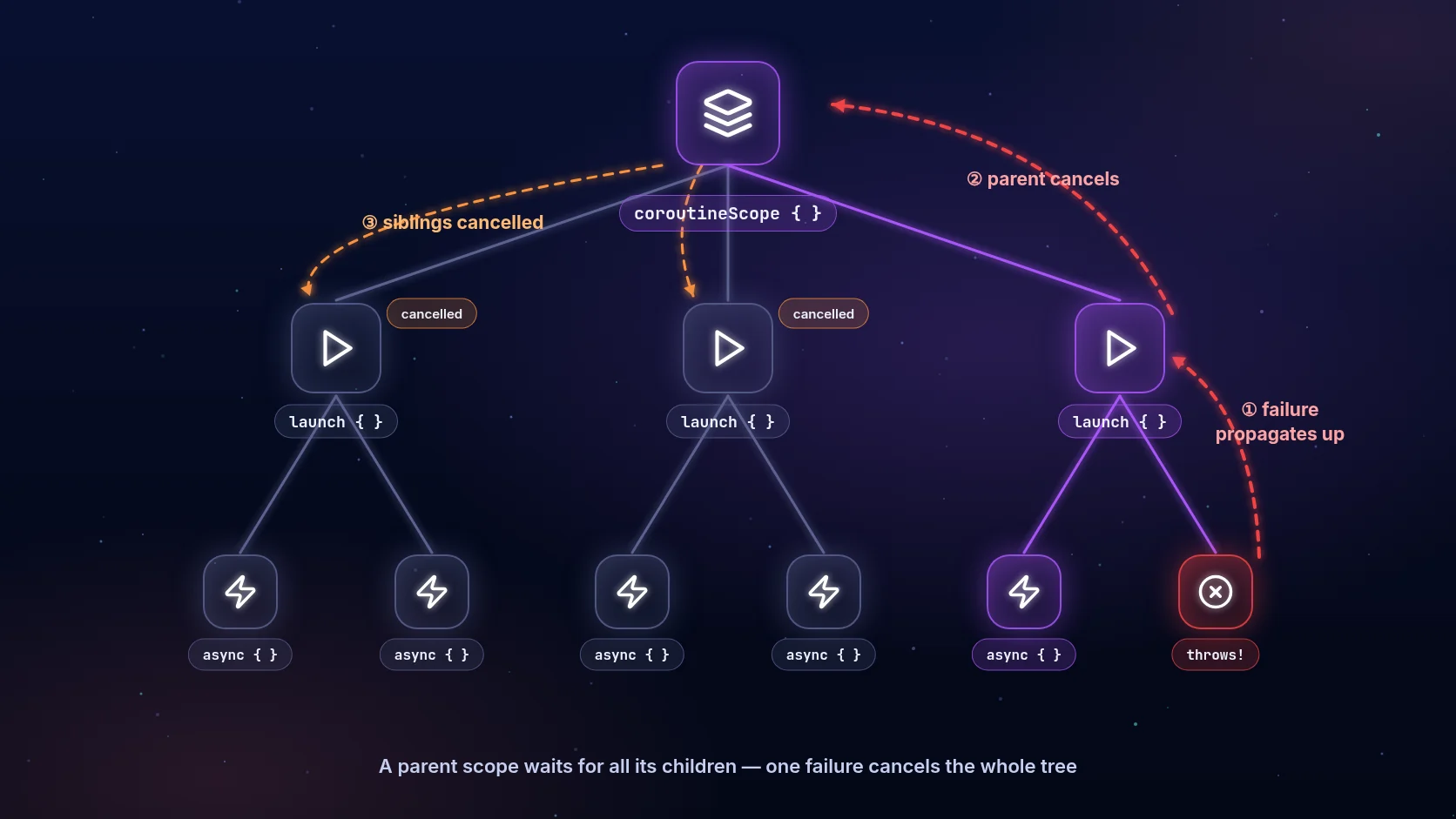
Compare this to GlobalScope.launch { ... }, which is structured concurrency’s opposite: a coroutine with no parent, tied to the application’s entire lifetime, that nothing will cancel for you. GlobalScope isn’t banned, but if you reach for it, ask yourself whether you actually mean “this should outlive the screen” or whether you just wanted to skip writing the scope. Nine times out of ten it’s the latter, and it’s how leaks like the one I opened with happen.
CoroutineScope best practices: viewModelScope, lifecycleScope, and building your own
Android gives you two scopes out of the box that already do the right thing:
viewModelScope— tied to theViewModel’sonCleared(). Use it for anything that should survive configuration changes but die when the screen is permanently gone.lifecycleScope— tied to aLifecycleOwner(Activity,Fragment). Combine it withrepeatOnLifecycle(Lifecycle.State.STARTED)when collecting aFlowso collection automatically pauses and resumes with the UI lifecycle instead of leaking work while the screen is backgrounded.
class ProfileFragment : Fragment() {
    override fun onViewCreated(view: View, savedInstanceState: Bundle?) {
        viewLifecycleOwner.lifecycleScope.launch {
            viewLifecycleOwner.repeatOnLifecycle(Lifecycle.State.STARTED) {
                viewModel.uiState.collect { state -> render(state) }
            }
        }
    }
}
For anything outside the Android framework classes — a repository, a use-case class, a background sync manager — you build your own scope explicitly:
class SyncManager(
    private val dispatcher: CoroutineDispatcher = Dispatchers.IO
) {
    private val scope = CoroutineScope(SupervisorJob() + dispatcher)

    fun start() {
        scope.launch { syncLoop() }
    }

    fun stop() {
        scope.cancel()
    }
}
Notice SupervisorJob() instead of a plain Job(). With a regular Job, one failed child cancels every sibling. With SupervisorJob, a failed child’s exception doesn’t automatically cancel its siblings — each child fails independently. This matters enormously in a scope that manages multiple unrelated background tasks: you don’t want a failed image-cache cleanup to silently kill an in-flight upload.
Kotlin Flow vs LiveData: which one to reach for in 2026
LiveData was a reasonable choice in 2018 because coroutines and Flow didn’t exist yet in usable form. In 2026, LiveData is effectively legacy — it’s still supported, some codebases still use it at the ViewModel-to-View boundary for its automatic lifecycle awareness, but Flow (specifically StateFlow and SharedFlow) has taken over everywhere else, and most new code uses Flow end to end.
The practical differences that matter:
| LiveData | Flow (StateFlow) | |
|---|---|---|
| Lifecycle awareness | Built-in | Manual, via repeatOnLifecycle |
| Operators (map, debounce, combine) | Limited | Full Kotlin Flow operator set |
| Works outside Android | No | Yes (pure Kotlin) |
| Cold vs hot | Hot, main-thread only | Flow is cold; StateFlow/SharedFlow are hot |
| Backpressure handling | None | Configurable via buffering strategies |
StateFlow is the right default for UI state — it always has a current value, it’s conflated (slow collectors don’t back up a queue of every intermediate state, they just get the latest), and it plays well with combine for merging multiple state sources:
class SearchViewModel : ViewModel() {
    private val query = MutableStateFlow("")
    private val filters = MutableStateFlow(SearchFilters())

    val results: StateFlow<List<Result>> = combine(query, filters) { q, f ->
        q to f
    }.debounce(300)
     .flatMapLatest { (q, f) -> searchRepository.search(q, f) }
     .stateIn(viewModelScope, SharingStarted.WhileSubscribed(5000), emptyList())
}
That debounce + flatMapLatest combination is doing real work: debounce waits for the user to stop typing, and flatMapLatest cancels any in-flight search the moment a new query arrives — a classic structured-concurrency win, since you’d otherwise need manual Job cancellation to avoid stale results overwriting fresh ones.
Dispatchers.IO vs Default vs Main: picking the right one
Dispatchers aren’t about creating threads — they’re about which thread pool a coroutine runs on when it’s not suspended. Getting this wrong doesn’t crash your app, it just quietly wastes resources or, worse, blocks the UI.
Dispatchers.Main— the Android UI thread. Anything touching Views or lifecycle callbacks must run here. Coroutine builders inviewModelScope/lifecycleScopedefault toMain.immediate.Dispatchers.IO— a large, elastic thread pool (up to 64 threads by default) tuned for blocking I/O: network calls, disk reads, database queries. Cheap to spin up more threads because they spend most of their time blocked/waiting, not computing.Dispatchers.Default— a thread pool sized to your CPU core count, for CPU-bound work: JSON parsing of large payloads, sorting, image processing, cryptographic hashing.Dispatchers.Unconfined— runs in the calling thread until the first suspension point, then resumes on whatever thread the resuming call happens on. Rarely what you want in application code; mostly useful for testing and specific library-internal cases.
The mistake I still see constantly: running a heavy JSON deserialization or bitmap transform on Dispatchers.IO because “it’s already a background thread.” IO’s thread pool is optimized for many blocked threads waiting on I/O, not for saturating CPU cores with computation. Mixing CPU-bound work into IO can starve genuinely I/O-bound coroutines competing for the same limited CPU cycles. Use withContext(Dispatchers.Default) for the CPU-heavy part specifically:
suspend fun loadAndProcessImage(url: String): Bitmap = withContext(Dispatchers.IO) {
    val bytes = httpClient.download(url)
    withContext(Dispatchers.Default) {
        decodeAndApplyFilters(bytes)
    }
}
Coroutine cancellation Android: cooperative, not forced
Cancellation in coroutines is cooperative — calling job.cancel() doesn’t forcibly kill a running coroutine the way Thread.stop() (long deprecated for good reason) would. It sets a flag, and the coroutine has to check that flag to actually stop. Every suspending function from kotlinx.coroutines (delay, withContext, channel operations) checks cancellation automatically and throws CancellationException at the next suspension point. The gotcha is tight, non-suspending loops:
// Bad — never checks for cancellation, keeps looping even after cancel()
suspend fun processLargeList(items: List<Item>) {
    for (item in items) {
        heavyComputation(item)
    }
}

// Good — cooperates with cancellation
suspend fun processLargeList(items: List<Item>) {
    for (item in items) {
        ensureActive()
        heavyComputation(item)
    }
}
The other classic mistake is swallowing CancellationException with a broad catch (e: Exception). Because CancellationException is a real exception type, an overly broad catch block will intercept it, log it as an “error,” and — worse — prevent the cancellation from actually propagating, leaving orphaned work running. If you must catch broadly, re-throw CancellationException:
try {
    doWork()
} catch (e: CancellationException) {
    throw e
} catch (e: Exception) {
    logError(e)
}
Kotlin coroutine exception handling: where errors actually go
Exception handling in coroutines depends entirely on the builder. launch propagates exceptions immediately up the coroutine tree the moment they occur — there’s no way to “catch” them at the call site since launch returns a Job, not a result. async instead captures the exception and re-throws it when you call .await(). This trips people up constantly: an unhandled exception in an async coroutine that’s never awaited can disappear silently, or under a SupervisorJob it cancels nothing but still needs to be surfaced somehow.
CoroutineExceptionHandler is the mechanism for catching otherwise-uncaught exceptions at the top of a coroutine tree — it only fires for launch-rooted coroutines, and only at the outermost scope, not for async:
val handler = CoroutineExceptionHandler { _, exception ->
    Log.e("SyncManager", "Unhandled coroutine failure", exception)
    crashReporter.recordException(exception)
}

val scope = CoroutineScope(SupervisorJob() + Dispatchers.IO + handler)
For anything you actually want to react to (show an error state, retry, fall back to cache), plain try/catch around the suspending call inside the coroutine is still the right tool — CoroutineExceptionHandler is a last-resort safety net, not your primary error-handling strategy.
Kotlin coroutine testing: kotlinx-coroutines-test in 2026
Testing coroutines used to mean either sprinkling runBlocking everywhere and eating real delays, or fighting with TestCoroutineDispatcher. The current approach centers on runTest, which uses a virtual-time scheduler — delay(10_000) inside a test completes instantly instead of actually waiting ten seconds:
@Test
fun `search debounces and cancels stale requests`() = runTest {
    val viewModel = SearchViewModel(fakeRepository)
    viewModel.onQueryChanged("k")
    advanceTimeBy(100)
    viewModel.onQueryChanged("kotlin")
    advanceUntilIdle()

    assertEquals(listOf("kotlin results"), viewModel.results.value)
}
advanceTimeBy and advanceUntilIdle give you deterministic control over the virtual clock instead of racing real time, which is what makes debounce/throttle logic actually testable without flaky sleep-based tests. Pair this with injecting a TestDispatcher in place of Dispatchers.Main via Dispatchers.setMain() in a JUnit rule, and you get fully deterministic coroutine tests with no real waiting and no flakiness from thread scheduling.
Frequently asked questions
Is GlobalScope ever acceptable? Rarely. It’s defensible for genuinely process-lifetime work — something that should keep running even if every screen is destroyed, like a WorkManager-adjacent background task — but even then, a purpose-built CoroutineScope in an Application-scoped singleton with SupervisorJob gives you more control and is easier to test.
Do coroutines replace RxJava entirely? For most Android teams building new code in 2026, yes — Flow covers the reactive-stream use cases RxJava was used for, with tighter language integration and no separate library to learn. Large existing RxJava codebases don’t need a rewrite; kotlinx-coroutines-rx3 bridges the two where needed.
What’s the difference between launch and async? launch starts a coroutine and returns a Job — use it when you don’t need a result back. async starts a coroutine and returns a Deferred<T> — use it when you need a value back via .await(), typically for running independent operations concurrently.
Does withContext create a new coroutine? No — it suspends the current coroutine, switches the dispatcher for the block inside, and resumes on the original dispatcher when the block completes. It’s a context switch, not a new child in the coroutine tree, which is why it’s the right tool for “do this part on a different dispatcher” rather than launch plus manual joining.
Closing thought
Coroutines don’t remove complexity from concurrent code — they relocate it, from tangled callback chains and manual thread bookkeeping into the type system and the scope hierarchy, where the compiler and the structured concurrency rules can actually help you catch mistakes. The leak I described at the start wasn’t a coroutines bug; it was a scope bug, and once you start seeing every launch call as “what tree does this belong to, and who’s responsible for cancelling it,” most of the classic Android concurrency bugs stop happening on their own. That mental shift, more than any specific API, is what structured concurrency is actually asking of you.