Jetpack Compose Goes Compose-First in 2026: What Android Developers Need to Know
I spent last week migrating a legacy RecyclerView screen to Compose, and about halfway through I realized I wasn’t doing it because I felt like it anymore — I was doing it because Google just told the entire Android ecosystem that Views is no longer where new work happens. That’s a bigger deal than another Compose point release, so I want to walk through what actually changed at I/O 2026, what’s new in Compose 1.12, and what it means for how you write Android UI code starting now.
Why “Compose-first” is the real headline of I/O 2026
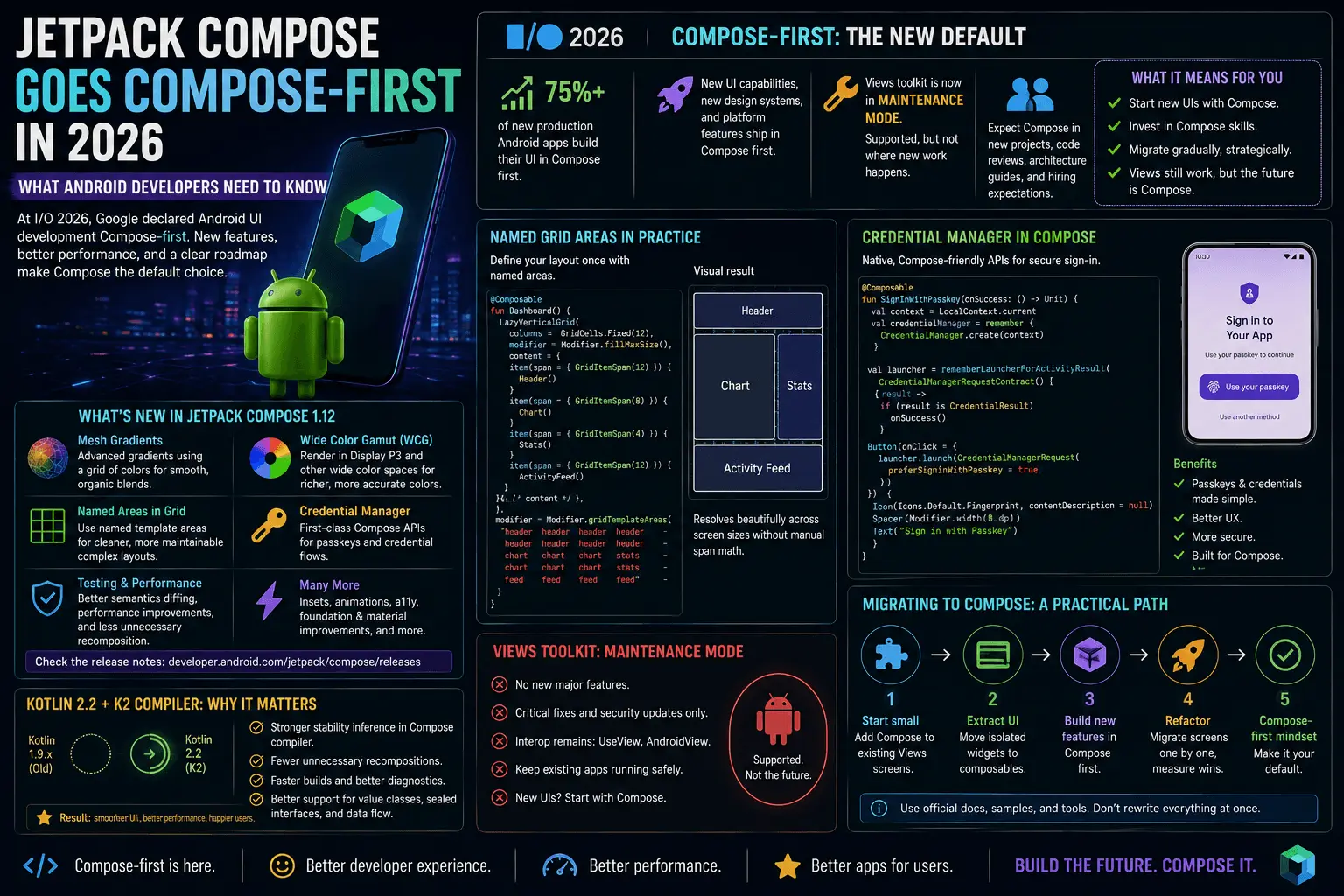
Every year Google ships new Jetpack Compose APIs and every year some of us treat it as optional homework — Views still worked, Compose interop was fine, and migrating an app wholesale felt like a nice-to-have. That calculus changed at I/O 2026. Google announced that Android UI development is now Compose-first: all new UI capabilities, new design system integrations, and new platform features will ship in Compose first, and the classic View toolkit has formally entered maintenance mode. Views isn’t disappearing tomorrow — decades of production code depend on it — but it stops being where the interesting work happens.
The number that made this concrete for me: over 75% of new production Android apps now build their UI in Compose first, not as an experiment layered over XML. That’s not early-adopter territory anymore, that’s the default. If you’re starting a new screen, a new module, or a new app in 2026, Compose isn’t the modern alternative — it’s the expected baseline, and Views is what you reach for only when you’re maintaining something that predates this shift.
For working Android developers, “Compose-first” translates into three concrete things:
- New Jetpack libraries (Credential Manager, CameraX extensions, WindowManager) design their primary integration surface for Compose, with View-based interop treated as a secondary path.
- Google’s own sample apps, codelabs, and architecture guidance assume Compose as the starting point.
- Hiring and code review norms are shifting — expect “why isn’t this a composable” to become a more common review comment than “why did you use Compose here.”

What’s new in Jetpack Compose 1.12
Compose 1.12 landed stable in August 2026, and it’s a meatier release than the version number suggests. The headline additions:
- Mesh Gradients — a new gradient primitive that goes beyond linear/radial/sweep, letting you define a grid of color points with smooth interpolation between them. Useful for the kind of soft, organic background treatments that used to require a custom
Shaderor a third-party library. - Wide Color Gamut (WCG) support — Compose can now render and interpolate colors in wider color spaces (like Display P3) on devices with WCG-capable screens, instead of being implicitly clamped to sRGB. This matters most for photo-heavy and design-forward apps where color fidelity is part of the product.
- Named areas in Grid layout —
LazyGridand the newerGridcomposable now support CSS-Grid-style named template areas, so you can lay out a dashboard or a complex screen by name instead of juggling row/column spans by index. - Credential Manager integration — first-class Compose APIs for passkey and credential UI flows, replacing the awkward “drop into an Activity result launcher” pattern that Compose apps had to lean on before.
- Testing and performance improvements — better semantics tree diffing for Compose UI tests, and continued work on reducing unnecessary recomposition scope, which pairs directly with the Kotlin 2.2 changes below.
Let’s go through the two I think are most immediately useful: named grid areas and Credential Manager.
Named grid areas in practice
If you’ve ever built a dashboard-style screen in Compose, you know the pain of LazyVerticalGrid with manual span calculations that break the moment you rearrange sections. Named areas fix that by letting you describe the layout declaratively, the same way CSS Grid template areas work on the web:
@Composable
fun DashboardScreen() {
    Grid(
        modifier = Modifier.fillMaxSize(),
        templateAreas = """
            "header header"
            "sidebar content"
            "sidebar footer"
        """,
        columns = GridCells.Fixed(2)
    ) {
        item(area = "header") { DashboardHeader() }
        item(area = "sidebar") { DashboardSidebar() }
        item(area = "content") { DashboardContent() }
        item(area = "footer") { DashboardFooter() }
    }
}
Rearranging the layout is now a one-line change to the templateAreas string instead of recalculating spans across every item. For anyone who’s maintained a tablet/foldable-responsive dashboard where the layout genuinely changes shape across window size classes, this is the feature I was waiting for — you can swap the template string per WindowSizeClass and get a structurally different layout without rewriting the item logic underneath it.
Credential Manager, the Compose-native way
Before 1.12, wiring up passkeys or saved-password sign-in in a Compose screen meant reaching out to an Activity-scoped launcher, which always felt like breaking out of the Compose mental model just to handle auth UI. The new integration keeps it in composable land:
@Composable
fun SignInButton(onCredentialResult: (Credential) -> Unit) {
    val credentialState = rememberCredentialManagerState()

    Button(onClick = {
        credentialState.launchSignIn(
            request = GetCredentialRequest(
                credentialOptions = listOf(GetPasskeyOption())
            ),
            onResult = onCredentialResult,
            onError = { /* handle failure, fall back to password */ }
        )
    }) {
        Text("Sign in with passkey")
    }
}
Small API, but it removes a real seam — you no longer need to thread an Activity reference or a rememberLauncherForActivityResult callback through a ViewModel just to trigger a credential prompt. It’s a good example of what “Compose-first” means in practice: the auth team designed the primary API surface for composables, not for Activities with Compose bolted on top.

Kotlin 2.2, the K2 compiler, and fewer unnecessary recompositions
The other half of this story isn’t a Compose release at all — it’s Kotlin 2.2, and specifically what the K2 compiler enables for the Compose compiler plugin. Kotlin 2.2 brought improved type inference, smarter compiler warnings, and context parameters, but the part that matters most for Compose performance is subtler: K2 gives the Compose compiler plugin a much better view into whether a type is actually stable.
Compose’s recomposition skipping only works when it can prove a composable’s parameters are stable — unstable types force recomposition even when nothing observable changed. Historically, this “stability inference” was conservative and sometimes wrong in ways that were hard to diagnose; a data class with a List<T> field, for instance, often got marked unstable even when you never mutated it. With K2’s improved analysis, the Compose compiler plugin infers stability more accurately, and teams upgrading to Kotlin 2.2 have reported 15-20% fewer unnecessary recompositions on list-heavy screens — feeds, chat threads, dashboards — purely from the compiler understanding their existing data classes better, with zero code changes required.
That said, you still get the best results by writing state in a way that plays well with stability inference rather than fighting it. Here’s the pattern I use now for list-heavy screens:
@Immutable
data class FeedItemUi(
    val id: String,
    val title: String,
    val isLiked: Boolean
)

@Stable
class FeedUiState(
    items: List<FeedItemUi>,
    isLoading: Boolean
) {
    var items by mutableStateOf(items)
        private set
    var isLoading by mutableStateOf(isLoading)
        private set

    fun updateItems(newItems: List<FeedItemUi>) {
        items = newItems
    }
}

@Composable
fun FeedList(state: FeedUiState) {
    LazyColumn {
        items(state.items, key = { it.id }) { item ->
            FeedRow(item) // stable param, skips recomposition when unchanged
        }
    }
}
Two things do the actual work here:
@ImmutableonFeedItemUitells the compiler this type never changes after construction, which is a stronger guarantee than “the compiler inferred it’s probably fine.”@StableonFeedUiState, combined withmutableStateOf-backed properties, means Compose can track exactly which reads matter and skip recomposition for rows whose underlying item didn’t change — especially important combined with thekeyparameter initems(), which lets Compose diff by identity instead of by list position.
Neither annotation is new to 2026, but they matter more now because K2’s improved inference means the compiler trusts your explicit annotations more precisely and stops silently downgrading types it used to treat as suspect. If you were annotating defensively before because inference was unreliable, Kotlin 2.2 is a good moment to revisit whether you still need every @Immutable you added out of caution — some of that ceremony is now redundant.
Compose Multiplatform: one Android/Kotlin codebase, four targets
The other piece of the 2026 Compose story that’s easy to miss if you’re Android-only: Compose Multiplatform now supports Android, iOS, Desktop, and Web from a single codebase. This isn’t a new project — Compose Multiplatform has been maturing for a few years — but by mid-2026 the story is genuinely production-ready across all four targets rather than “Android and Desktop work, iOS is experimental.”
For a lot of Android teams, this changes the build-vs-share calculus for internal tools and even consumer surfaces. A settings screen, an admin dashboard, a companion desktop app — code you’d previously have written three times (Android, iOS, web) can now live once, in Kotlin, using the same composables and the same stability patterns described above. The Compose-first shift on the Android side and the Compose Multiplatform maturity are clearly the same strategic bet from Google/JetBrains: Compose isn’t just “Android’s modern UI toolkit” anymore, it’s positioned as Kotlin’s cross-platform UI answer, full stop.

Should you migrate your Views-based app now?
This is the question I keep getting asked, and the honest answer depends on where your app sits:
- New screens in an existing app — write them in Compose. There’s no longer a credible argument for starting a new screen in XML in 2026; you’d be building on a toolkit in maintenance mode from day one.
- Actively changing legacy screens — migrate opportunistically. Use
ComposeViewinterop to convert screens as you touch them for other reasons, rather than freezing feature work for a big-bang rewrite. - Stable, rarely-touched legacy screens — leave them. Views in maintenance mode still means maintained — security patches and critical bug fixes keep flowing, it just won’t get new capabilities. There’s no urgency to rewrite code that isn’t causing problems.
- Brand-new apps — Compose-first, full stop, and worth evaluating whether Compose Multiplatform makes sense if you know you’ll need iOS or desktop down the line.
The mistake I’d avoid is treating “Compose-first” as a mandate to rewrite everything this quarter. It’s a signal about where new investment goes, not a deadline.
FAQ
Is Jetpack Compose 1.12 stable? Yes — it shipped stable in August 2026 with Mesh Gradients, Wide Color Gamut support, named Grid layout areas, Credential Manager integration, and testing/performance improvements.
What does “Compose-first” actually mean for the Android Views toolkit? Views has entered maintenance mode. It still receives critical fixes, but all new Android UI capabilities and Jetpack library integrations are designed for Compose first, with View-based support as secondary or not offered at all going forward.
Does upgrading to Kotlin 2.2 improve Compose performance automatically?
Largely yes, for existing code — teams have reported 15-20% fewer unnecessary recompositions on list-heavy screens purely from K2’s improved stability inference, without code changes. You still get the most benefit by pairing the upgrade with @Immutable/@Stable annotations on your UI state classes.
What is Compose Multiplatform used for in 2026? Building Android, iOS, Desktop, and Web UI from one shared Kotlin/Compose codebase. It’s matured to the point where all four targets are considered production-viable, not just Android and Desktop.
Do I need to rewrite my whole app in Compose right now? No. Migrate opportunistically — new screens in Compose, legacy screens converted as you touch them for other reasons, and stable screens left alone until there’s a real reason to change them.
Closing thought
The Views-to-Compose transition has been “coming eventually” for long enough that it was easy to keep deprioritizing it. I/O 2026 removed that option — Compose-first is now the platform’s stated direction, not a recommendation. What actually convinced me this cycle is real, though, isn’t the announcement itself, it’s that the tooling underneath it got genuinely better at the same time: named grid areas solve a layout problem I’ve hit on every dashboard screen I’ve built, and the Kotlin 2.2 stability inference improvements gave me measurable recomposition wins on a list screen without touching a line of UI code. That combination — a strategic mandate plus a compiler that actually earns it — is why I’m treating this migration as work worth doing now instead of another year of “eventually.”