
Python asyncio in 2026: A Practical Guide to Async/Await
A practical guide to Python asyncio in 2026 — how the event loop actually works, async/await syntax, tasks, gather, common pitfalls, and when to pick asyncio over threading or multiprocessing.
On this page
I spent my first few weeks with asyncio writing code that looked async but ran exactly like synchronous code — one await at a time, zero concurrency gained, and no error telling me why. The syntax is deceptively simple; the mental model underneath it is not. This is the guide I wish I’d had: what the event loop actually does, how async/await really behaves, and the specific mistakes that make people give up on asyncio and reach for threads instead.
Why asyncio exists: the problem with I/O-bound waiting
Most programs that feel “slow” aren’t CPU-bound — they’re waiting. Waiting on a database query, a downstream API, a file read over a network mount. A single-threaded synchronous program spends that waiting time doing nothing useful; the CPU sits idle while your code blocks on requests.get() or a DB call.
Threads can fix this, but each OS thread carries real overhead — megabytes of stack space, kernel-level context switches, and in CPython, the GIL still serializes bytecode execution even though I/O releases it. Spin up a few thousand threads to handle a few thousand concurrent connections and you’ll feel the memory and scheduling cost.
asyncio takes a different approach: one thread, one event loop, and cooperative multitasking. Instead of the OS deciding when to pause your code, your code explicitly says “I’m waiting now, run something else” via await. Thousands of coroutines can be in flight on a single thread because most of them are just parked, waiting on I/O, costing almost nothing while they wait.
How the event loop actually works
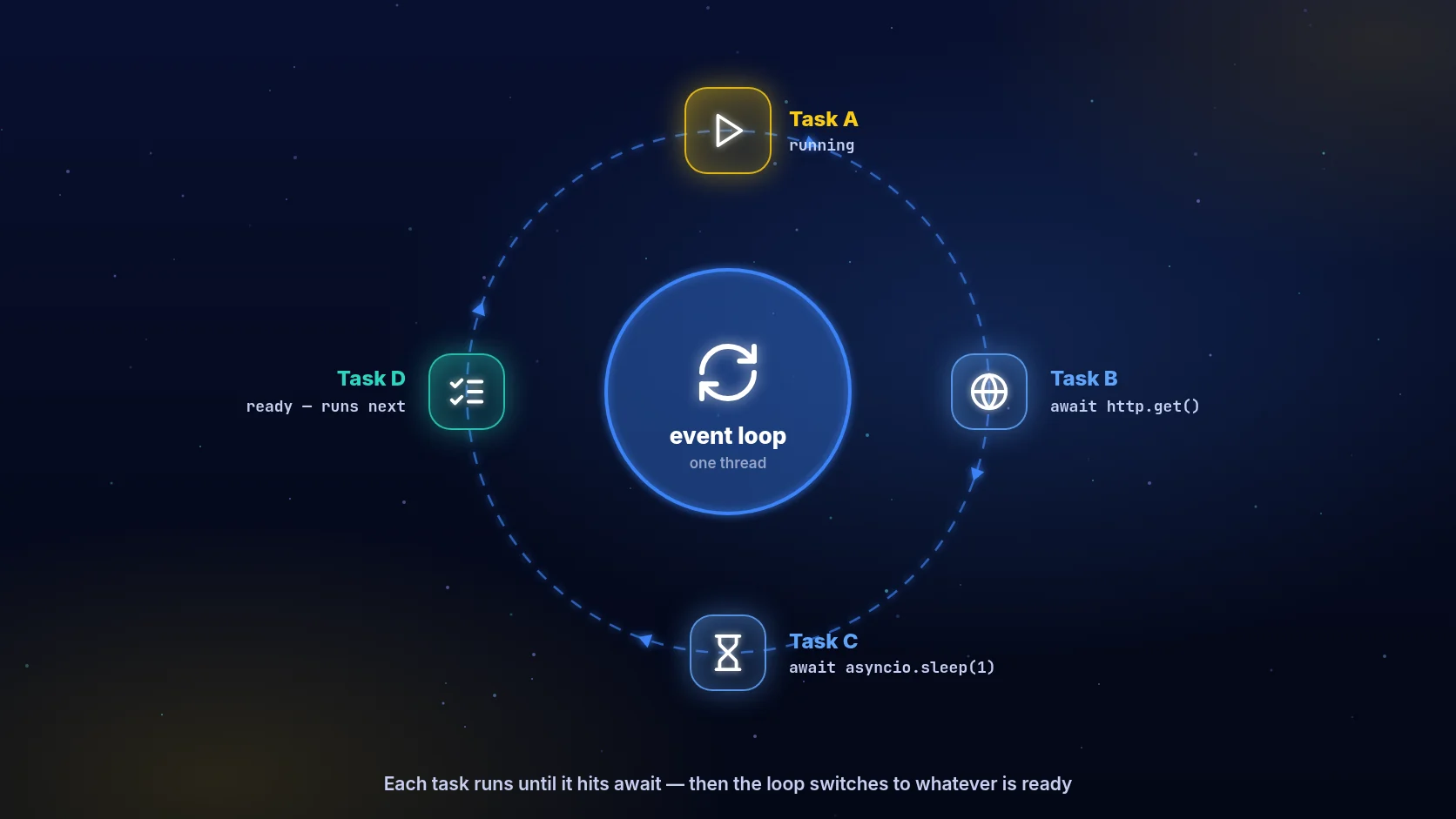
The event loop is the engine at the center of everything. It maintains a queue of tasks and callbacks, and it runs a simple cycle: pick the next ready task, run it until it hits an await that isn’t ready yet, then move to the next ready task. Nothing runs in parallel — it’s all interleaved on one thread.
import asyncio
import time

async def worker(name, delay):
    print(f"{name}: starting")
    await asyncio.sleep(delay)   # yields control back to the event loop
    print(f"{name}: done after {delay}s")

async def main():
    start = time.time()
    await asyncio.gather(
        worker("A", 2),
        worker("B", 1),
        worker("C", 3),
    )
    print(f"Total: {time.time() - start:.1f}s")

asyncio.run(main())
Run this and all three workers print “starting” immediately, then finish in order B, A, C — total elapsed time is about 3 seconds, not 6. That’s the entire value proposition of asyncio in one example: three waits overlapped into one wall-clock wait, using a single thread.
The key mechanic is await asyncio.sleep(delay). It doesn’t block the thread — it tells the event loop “wake me up in delay seconds, and in the meantime, go run something else.” Every well-behaved async library (aiohttp, asyncpg, aiofiles) is built the same way: instead of blocking on a socket read, it registers interest with the event loop and yields control until data is ready.
async/await syntax: coroutines, not threads
An async def function doesn’t run when you call it — calling it returns a coroutine object, a paused computation that does nothing until something drives it forward.
async def fetch_data():
    return 42

coro = fetch_data()
print(coro)          # <coroutine object fetch_data at 0x...>
# nothing has executed yet

result = asyncio.run(coro)   # actually runs it
print(result)                 # 42
await is how one coroutine hands control to another and gets the result back when it’s ready. You can only use await inside an async def function — that’s the compile-time contract that keeps track of which functions are “async-aware.”
async def get_user(user_id):
    await asyncio.sleep(0.1)   # pretend network call
    return {"id": user_id, "name": "Anoop"}

async def get_orders(user_id):
    await asyncio.sleep(0.1)
    return ["order-1", "order-2"]

async def get_profile(user_id):
    user = await get_user(user_id)
    orders = await get_orders(user_id)
    return user, orders
Notice get_profile above runs its two awaits sequentially — 0.2s total, not concurrent. Writing await twice in a row doesn’t give you concurrency automatically; it just means “wait for this, then wait for that.” Concurrency needs an explicit scheduling primitive, which is where tasks and gather come in.
Tasks and asyncio.gather: getting actual concurrency
A coroutine on its own is just a plan. Wrapping it in a Task schedules it on the event loop immediately, so it starts making progress in the background while your code continues.
async def get_profile_concurrent(user_id):
    user_task = asyncio.create_task(get_user(user_id))
    orders_task = asyncio.create_task(get_orders(user_id))
    # both are now running concurrently in the background

    user = await user_task
    orders = await orders_task
    return user, orders
This version takes ~0.1s instead of ~0.2s, because both calls were in flight at the same time. asyncio.create_task() is the fix for the “sequential awaits” trap above — it’s what actually launches concurrent work; a bare await just consumes work that’s already running (or starts and immediately waits on it if it isn’t a task).
asyncio.gather() is the common shorthand for “run these coroutines concurrently and collect all the results”:
async def get_profile_gather(user_id):
    user, orders = await asyncio.gather(
        get_user(user_id),
        get_orders(user_id),
    )
    return user, orders
gather() accepts either coroutines or tasks, schedules them all, and returns results in the same order you passed them in — regardless of which one finishes first. By default, if one of them raises, gather() cancels the rest and re-raises immediately; pass return_exceptions=True if you’d rather collect exceptions alongside successful results instead of failing fast.
For newer code, asyncio.TaskGroup (3.11+) is the better-behaved alternative to gather() — it guarantees that if one task fails, the others are cancelled and cleaned up properly, and it surfaces multiple failures together instead of hiding all but the first:
async def get_profile_taskgroup(user_id):
    async with asyncio.TaskGroup() as tg:
        user_task = tg.create_task(get_user(user_id))
        orders_task = tg.create_task(get_orders(user_id))
    return user_task.result(), orders_task.result()
Reach for TaskGroup in new code; reach for gather() when you’re reading or maintaining code written before 3.11, or when you specifically want the return_exceptions collect-everything behavior.
Common asyncio pitfalls (the ones that bite everyone)
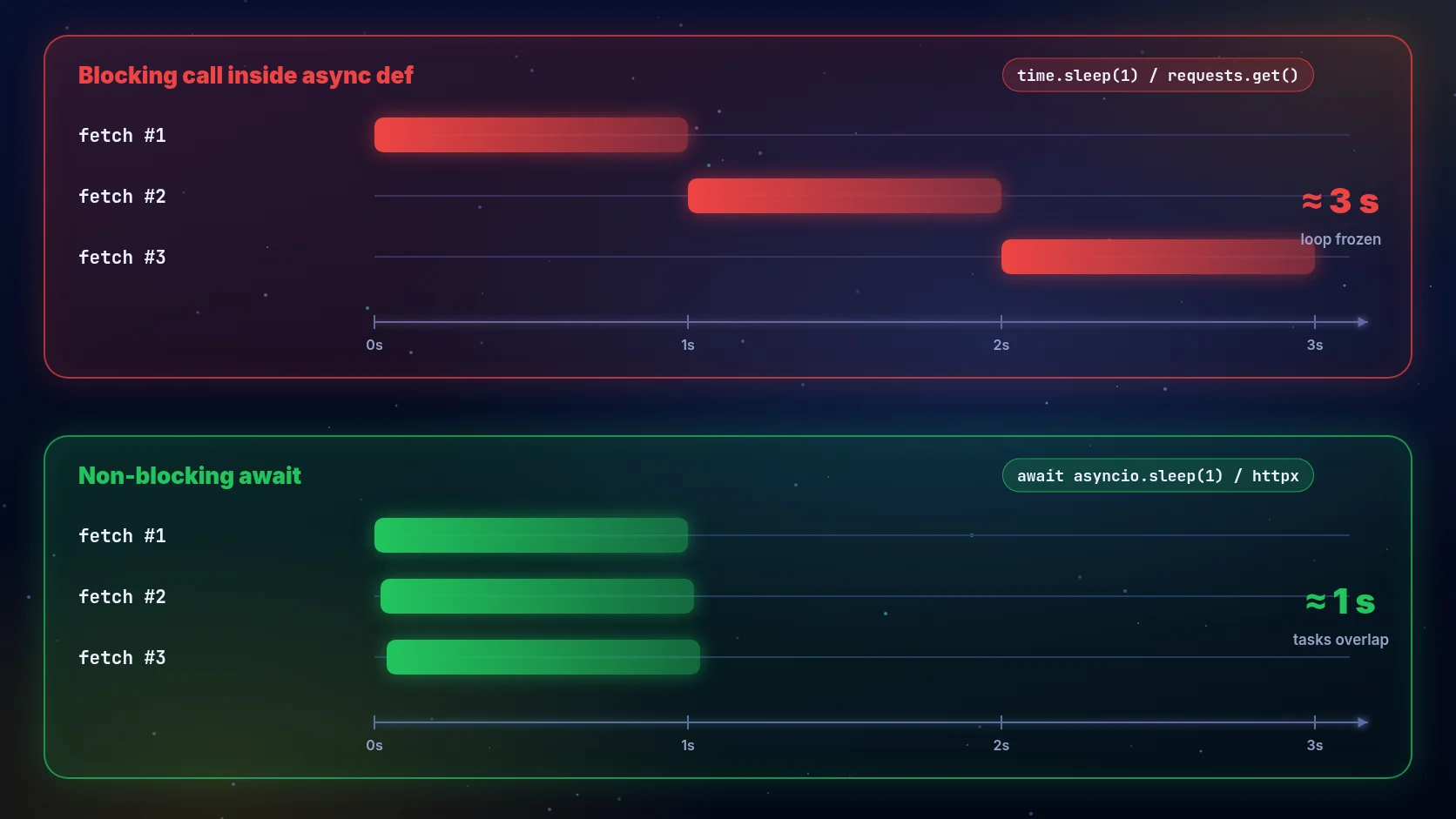
1. Calling a blocking function inside a coroutine. This is the single most common way people accidentally undo all of asyncio’s benefit.
import time

async def bad_worker():
    time.sleep(2)   # BLOCKS the entire event loop, not just this coroutine
    return "done"

# Every other coroutine on this event loop freezes for 2 full seconds.
time.sleep(), synchronous requests.get(), blocking file I/O, and CPU-heavy loops all hold the single thread hostage — nothing else on the event loop can run until they return. The fix is either an async-native library (asyncio.sleep, aiohttp, asyncpg) or, when you can’t avoid a blocking call, offloading it:
async def ok_worker():
    loop = asyncio.get_running_loop()
    result = await loop.run_in_executor(None, blocking_function, arg1, arg2)
    return result
run_in_executor hands the blocking call to a thread pool behind the scenes, so the event loop stays free while it runs.
2. Forgetting to await a coroutine. Calling an async function without await (or without wrapping it in a task) just creates a coroutine object and does nothing — Python will warn you (“coroutine was never awaited”) but only at garbage-collection time, which can be well after the bug mattered.
async def main():
    get_user(1)          # BUG: coroutine created, never scheduled, silently does nothing
    await get_user(1)    # correct
3. Mixing sync and async database/HTTP libraries. Using requests or a synchronous DB driver inside an async def function compiles fine and runs — it just blocks the loop exactly like time.sleep() does. If you’re going async, go async end-to-end: aiohttp/httpx instead of requests, asyncpg/aiomysql instead of the synchronous drivers.
4. Unhandled exceptions in fire-and-forget tasks. A task created with create_task() and never awaited will silently swallow its exception unless you keep a reference and check it, or use TaskGroup, which surfaces failures automatically.
tasks = set()
task = asyncio.create_task(some_coro())
tasks.add(task)
task.add_done_callback(tasks.discard)   # keeps a reference so it isn't GC'd mid-flight
asyncio vs threading vs multiprocessing: picking the right tool
Python gives you three separate concurrency models, and they solve different problems. Confusing them is the second-biggest source of asyncio frustration after the blocking-call trap.
| Model | Best for | Overhead | Parallelism |
|---|---|---|---|
asyncio |
I/O-bound, many concurrent waits (HTTP calls, DB queries, sockets) | Very low — one thread, thousands of coroutines | None — cooperative, single thread |
threading |
I/O-bound, but working with libraries that aren’t async-native | Moderate — real OS threads, GIL still serializes CPU work | Effectively none for CPU-bound code (GIL); real overlap for I/O waits |
multiprocessing |
CPU-bound work — parsing, number crunching, image processing | High — separate processes, memory not shared, pickling costs | True parallelism across cores |
The decision in practice comes down to one question: is the bottleneck waiting, or computing?
- Waiting on network calls, databases, or file I/O, and you control the whole call chain (or async libraries exist for it)? Use
asyncio. It scales to the most concurrent connections per unit of memory. - Waiting on I/O, but stuck with a synchronous-only library you can’t replace? Use
threading, or wrap the blocking calls withrun_in_executorinside an asyncio app to get the best of both. - Crunching numbers, transforming large datasets, or doing anything that pegs a CPU core?
asyncioandthreadingwon’t help — the GIL prevents real parallel execution of Python bytecode either way. Reach formultiprocessing(orconcurrent.interpreters, new in Python 3.14, for lighter-weight isolated parallelism without full process overhead).
A realistic web scraper, for example, typically ends up using two of the three: asyncio plus aiohttp for the concurrent HTTP fetching, and a ProcessPoolExecutor for CPU-heavy HTML parsing or data cleanup once the raw pages are in hand — asyncio handles the waiting, multiprocessing handles the computing.
Real-world example: fetching multiple APIs concurrently
Here’s a small but complete pattern — fetching from several endpoints concurrently with a timeout and per-request error isolation, close to what you’d actually ship:
import asyncio
import aiohttp

async def fetch(session, url):
    try:
        async with session.get(url, timeout=aiohttp.ClientTimeout(total=5)) as resp:
            return url, resp.status, await resp.text()
    except asyncio.TimeoutError:
        return url, None, "timed out"
    except aiohttp.ClientError as e:
        return url, None, str(e)

async def fetch_all(urls):
    async with aiohttp.ClientSession() as session:
        results = await asyncio.gather(*(fetch(session, u) for u in urls))
    return results

urls = [
    "https://api.example.com/users",
    "https://api.example.com/orders",
    "https://api.example.com/inventory",
]
results = asyncio.run(fetch_all(urls))
for url, status, body in results:
    print(url, status, len(body) if status else body)
One shared ClientSession reuses connections across all requests, gather() runs all three fetches concurrently, and each fetch() catches its own timeout/error so one slow endpoint doesn’t take down the whole batch.
FAQ
Does asyncio make Python code run faster? Not for CPU-bound work — it doesn’t add parallelism, it removes idle waiting. For I/O-bound workloads with lots of concurrent waits, it can cut wall-clock time dramatically by overlapping those waits instead of doing them one at a time.
Can I use asyncio and threading together?
Yes, and it’s a common real pattern — loop.run_in_executor() offloads blocking or CPU-light synchronous calls to a thread pool from inside an async function, letting the event loop stay responsive.
What’s the difference between asyncio.gather and asyncio.TaskGroup?
gather() is older, widely used, and supports return_exceptions=True to collect all results including failures. TaskGroup (3.11+) has stricter structured-concurrency semantics — a failure cancels sibling tasks automatically and surfaces cleanly — and is generally the better default in new code.
Why did my async function run synchronously with no speedup?
Almost always one of two causes: you awaited coroutines sequentially instead of scheduling them as tasks first, or a blocking call (time.sleep, synchronous HTTP/DB library) inside the coroutine froze the whole event loop while it ran.
Is asyncio a replacement for multiprocessing? No — different problems. asyncio helps with concurrent waiting; multiprocessing helps with parallel computing. Many real applications use both for different parts of the same pipeline.
Closing thought
Asyncio’s syntax is small enough to learn in an afternoon — async, await, create_task, gather — but the concurrency model underneath takes longer to internalize, because it punishes the same instincts that serve you fine in synchronous code. The one habit worth building first: before you write await, ask whether you actually need the result right now, or whether you could schedule it as a task and keep moving. That single question is most of what separates async code that helps from async code that just looks the part.