I built a free Android soundboard that works with a External keyboard
A few months ago I needed a simple soundboard for a live session. I wanted to trigger audio clips from a Bluetooth keyboard connected to my Android phone - just press a key, hear the sound, instantly.
Every app I found was either subscription-based, required an account, or didn’t support physical keyboards at all. So I built CTunes.
What CTunes does
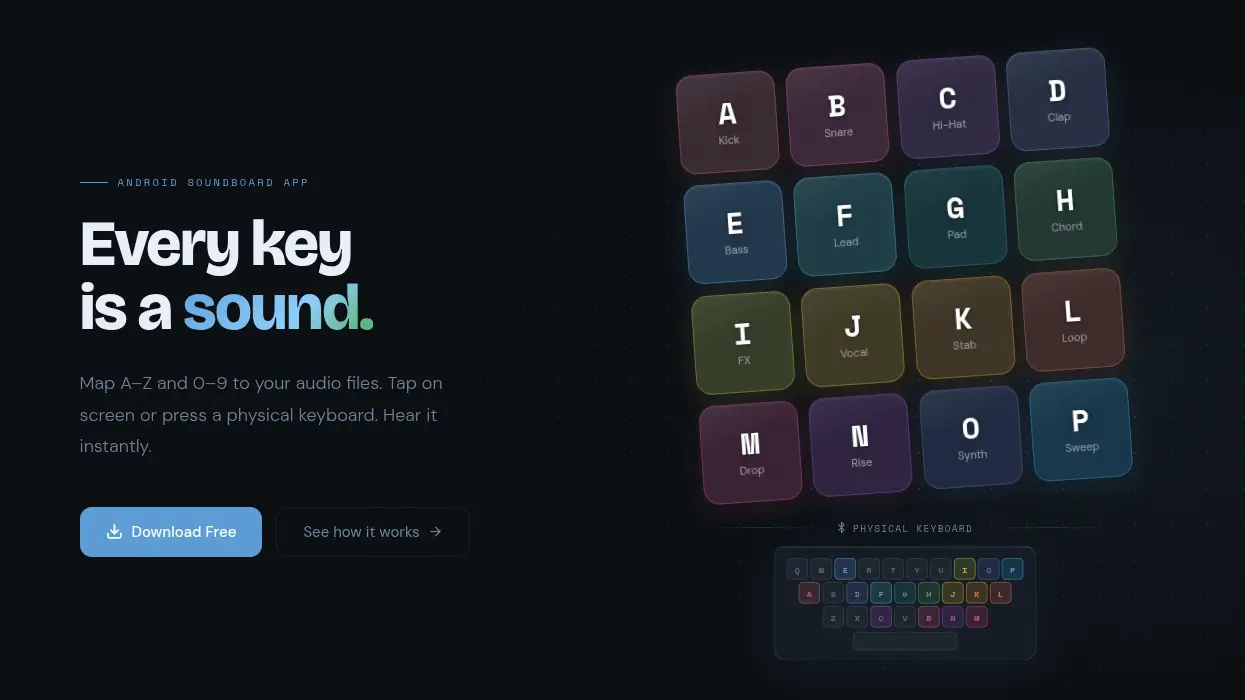
CTunes maps keyboard keys (A-Z and 0-9) to audio files on your device. Tap the on-screen button or press the physical key - the sound plays immediately.
That’s the whole pitch. 36 keys. Any audio file. Zero lag.
Core features:
- Key mapping - pick any audio file from your device and assign it to a key
- Dual input - works with on-screen taps and physical Bluetooth keyboards
- 18-color palette - each key gets a unique color so you can read the board at a glance
- Import / Export - your entire layout serialises to a single JSON file. Back it up, share it, restore it on a new device.
- Persistent storage - mappings survive reboots and reinstalls via SQLite +
takePersistableUriPermission() - Free - ad-supported, no subscription, no sign-in, works fully offline
The tech stack
CTunes is a native Android app written in Java (yes, Java - not Kotlin). Here’s how the main pieces fit together:
Architecture:
- Single-module project, Activities only - no Fragments, no Navigation component
- SQLite via a hand-rolled
SQLiteOpenHelperfor key mappings SharedPreferencesfor UI settings (grid size, column count, keyboard visibility)
Audio playback:
// A new MediaPlayer is created per keypress
// The previous one is released first to avoid leaks
if (currentPlayer != null) {
    currentPlayer.release();
}
MediaPlayer mp = MediaPlayer.create(this, uri);
if (mp != null) {
    mp.setOnCompletionListener(MediaPlayer::release);
    mp.start();
    currentPlayer = mp;
}
Using MediaPlayer.create() per press keeps it simple. For a soundboard with occasional clips this is fine - you’re not building a DAW.
File access:
// Persist URI permission so the file remains accessible after reboot
getContentResolver().takePersistableUriPermission(
    uri,
    Intent.FLAG_GRANT_READ_URI_PERMISSION
);
This was the gotcha I hit early on. Android’s Storage Access Framework grants temporary URI permissions by default. Without takePersistableUriPermission(), all your mappings silently break after the user reboots their phone.
Import / Export: The export format is a simple JSON envelope:
{
  "version": 1,
  "exported_at": "2026-03-25T10:00:00Z",
  "mappings": [
    { "key": "A", "name": "Kick", "uri": "content://..." },
    { "key": "B", "name": "Snare", "uri": "content://..." }
  ]
}
Import is atomic - the entire database is cleared before inserting the new set. Simple and predictable.
Ads:
The app is ad-supported using Google AdMob. One thing worth noting: always initialise MobileAds after the UMP (User Messaging Platform) consent flow resolves - not in Application.onCreate(). Use an AtomicBoolean guard to prevent double-initialisation across the UMP callbacks:
private final AtomicBoolean mobileAdsInitialized = new AtomicBoolean(false);

private void initializeMobileAds() {
    if (mobileAdsInitialized.getAndSet(true)) return;
    MobileAds.initialize(this, status -> loadNativeAd());
}
What I learned
1. takePersistableUriPermission is not optional.
If you let users pick files via ACTION_OPEN_DOCUMENT, you must persist the URI or your app breaks silently on reboot. Took me an embarrassing amount of time to track this down.
2. Activity lifecycle leaks in ad callbacks.
AdMob’s NativeAd.OnNativeAdLoadedListener fires on a background thread. By the time it fires, the Activity might already be destroyed. Always guard:
if (isDestroyed() || isFinishing()) return;
3. Keep the architecture boring. No Fragments, no Navigation component, no MVVM. For an app this size, plain Activities with direct SQLite calls are completely fine. Resisting the urge to over-architect saved a lot of time.
4. Physical keyboard support is free on Android.
Override onKeyDown() in your Activity and you get Bluetooth keyboard input with zero extra dependencies. Android routes hardware key events to the focused window automatically.
@Override
public boolean onKeyDown(int keyCode, KeyEvent event) {
    char c = (char) event.getUnicodeChar();
    if (Character.isLetterOrDigit(c)) {
        playKeySound(Character.toUpperCase(c));
        return true;
    }
    return super.onKeyDown(keyCode, event);
}
Try it
I’d love feedback - especially from anyone who uses soundboards for live performance, streaming, or teaching. What features would make this more useful for your workflow?